


As the title stated, we shall see how to communicate between a Visualforce page and a Lightning Component on a Lightning Page. Salesforce has provided us with Lightning Message Service to perform exactly what we are looking for.
Unfortunately, it comes with some limitations and the main one is that it is not yet supported in the Salesforce Mobile Application (at the time of writing). This isn’t something you want in 2021. You want your sales team to have immediate access to critical information at exactly the time they need it.
That’s why we shall show you how to share information between a Visualforce page and a Lightning Component. We shall take advantage of the Web Messaging API. After all, we are using web browser either on desktop or in the mobile app.
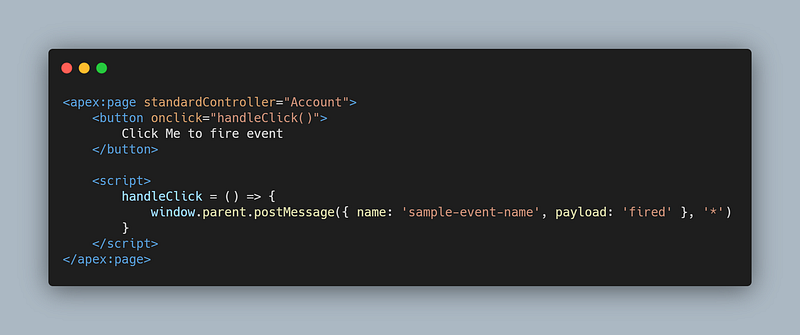
Broadcasting event from Visualforce Page
Keep in mind that Visualforce pages are loaded in iframe on a Lightning Page and even when embed in a page layout. That’s why you will notice the window.parent code part. This will make sure that we are targeting the parent level.
Event Handling in Aura Component
On the other hand, Lightning Components are not loaded in iframes but instead rendered on the main page. To listen on post message event, we just need to add an event listener.

We make use of the window.addEventListener('message', callback) to listen to post message. If you are wondering, the same apply for Ligtning Web Component (LWC), but instead of using the message event, we make use of the LWC custom event. (Maybe we can cover this part also in another article)

Notice the $A.getCallback, this is important so that we can execute our code in the aura rendering cycle. Without it, you may suffer performance issue and lose a lot of time debugging your code.
In the SharinPix AppExchange, we communicate a lot with event and these basic implementations help us delivery features quickly and it works both on Desktop and Salesforce Mobile App. Do check out what amazing features we have in stock for you. Link to the AppExchange is here.
Demo
Things to remember
- Visualforce page are embed in lightning page within an iframe.
- Lightning Component are rendered directly on the page but are protected by the Lightning Locker service. They can communicate through events.
- Even if we are using Salesforce, it is just web and we can leverage a lot from the Web standard here.
At Spoon Consulting, we have a lot of experts who can help with your Salesforce Implementation. Send us an email on contact@spoonconsulting.com or visit our website for more info www.spoonconsulting.com.
Related article


Leave a Reply